| Step 1 | Step 2 | Finishing Up |
|---|---|---|
|
I wanted the face to be more symmetric, so in Paint Shop Pro, I captured half of the face, cut it onto a new canvas for one side, then pasted the mirrored version of the same half to the other side.
|
I rotated between Corel and Paint Shop for these next steps. I would use the effects offered in Corel to distort the same face image, then use Paint Shop to layer the face images on top of each other.
I actually ended up using five layers on top of the base layer just to get the face where I wanted it.
The next process involved adding the lettering and the third eye. Since I don't have a tablet (yet), the words were hand written then scanned. Next I applied effects to the words and added the words as another layer onto the face.
|
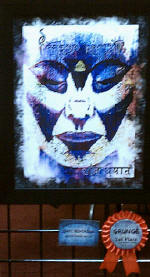
The last steps involved placing the face onto a mottled black background to frame it out, then smoking out the edges to get the final result:
The final number of layers turned out to be seventeen. |
 Quiet
Meditation started out as a Tempura painting I had completed on paper.
After several frustrating shots, I finally got a clear digital photo of
it. I would have scanned it, but the painting is much larger than my
scanner.
Quiet
Meditation started out as a Tempura painting I had completed on paper.
After several frustrating shots, I finally got a clear digital photo of
it. I would have scanned it, but the painting is much larger than my
scanner.
 Using
Corel Photo Paint, I created a grunged image to use as my base background.
Using
Corel Photo Paint, I created a grunged image to use as my base background.


 The
words above the face is my Buddhist name given to me when I sought refuge
with the
The
words above the face is my Buddhist name given to me when I sought refuge
with the